




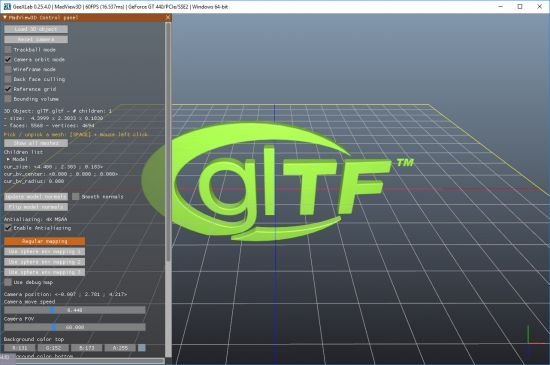
MadView3D 0.4.0 (x64) l File size: 18.5 MB
MadView3D is simple 3D object viewer based on GeeXLab.MadView3D uses the Assimp plugin added in GeeXLab 0.21+ to load 3D objects. The Assimp plugin supports many 3D files formats: .3ds, .obj, .lwo, .glft, .fbx, .stl, and much more. The complete list is available here:
*.3d;*.3ds;*.3mf;*.ac;*.ac3d;*.acc;*.amf;*.ase;*.ask;*.assbin;*.b3d;*.blend;*.bvh;*.cob;*.csm;*.dae;*.dxf;*.enff;*.fbx;*.glb;*.gltf;*.hmp;*.ifc;*.ifczip;*.irr;*.irrmesh;*.lwo;*.lws;*.lxo;*.md2;*.md3;*.md5anim;*.md5camera;*.md5mesh;*.mdc;*.mdl;*.mesh;*.mesh.xml;*.mot;*.ms3d;*.ndo;*.nff;*.obj;*.off;*.ogex;*.pk3;*.ply;*.pmx;*.prj;*.q3o;*.q3s;*.raw;*.scn;*.sib;*.smd;*.stl;*.stp;*.ter;*.uc;*.vta;*.x;*.x3d;*.x3db;*.xgl;*.xml;*.zgl
MadView3D 0.4.0 (x64) l File size: 18.5 MB
MadView3D is simple 3D object viewer based on GeeXLab.MadView3D uses the Assimp plugin added in GeeXLab 0.21+ to load 3D objects. The Assimp plugin supports many 3D files formats: .3ds, .obj, .lwo, .glft, .fbx, .stl, and much more. The complete list is available here:
*.3d;*.3ds;*.3mf;*.ac;*.ac3d;*.acc;*.amf;*.ase;*.ask;*.assbin;*.b3d;*.blend;*.bvh;*.cob;*.csm;*.dae;*.dxf;*.enff;*.fbx;*.glb;*.gltf;*.hmp;*.ifc;*.ifczip;*.irr;*.irrmesh;*.lwo;*.lws;*.lxo;*.md2;*.md3;*.md5anim;*.md5camera;*.md5mesh;*.mdc;*.mdl;*.mesh;*.mesh.xml;*.mot;*.ms3d;*.ndo;*.nff;*.obj;*.off;*.ogex;*.pk3;*.ply;*.pmx;*.prj;*.q3o;*.q3s;*.raw;*.scn;*.sib;*.smd;*.stl;*.stp;*.ter;*.uc;*.vta;*.x;*.x3d;*.x3db;*.xgl;*.xml;*.zgl
I developed this tool because I often need to check if a 3D object can be loaded in GeeXLab demos and what are its properties (number of meshes and materials, number of faces and vertices, correct uv-mapping, etc.).
For this first version, MadView3D comes with the following features:
orbit and fly (or ghost) camera modes
trackball mode
wireframe or solid rendering modes
sphere env mapping rendering mode
debug map to check uv-mapping (texture coordinates)
information about the 3D object: number of faces and vertices, number and names of sub-meshes and materials
mesh selection by 3D picking (SPACE key + mouse left click) or selection in a list
customization of background color
customization of light color
Whats New:
+ added new functions like the display of vertex normals.
+ [Windows] added option to add and remove MadView3D
to and from Explorer context menu (Options > MISC).
+ settings are saved in a SQLite3 database.
! changed and improved the user interface.
! Assimp plugin updated with latest Assimp 5.0 sdk.
! updated with GeeXLab 0.29.7 that fixes many bugs
since version 0.27.

Download From NitroFlare
https://nitroflare.com/view/5EA75C141E4E0F4/MadView3D_0.4.0_win64.M_F_T.zip
Download From Rapidgator
https://rapidgator.net/file/d1b5c794b999d1d56979252875439461/MadView3D_0.4.0_win64.M_F_T.zip.html
Feel free to post your MadView3D 0.4.0 (x64) Free Download, torrent, subtitles, free download, quality, NFO, Dangerous MadView3D 0.4.0 (x64) Torrent Download, free premium downloads movie, game, mp3 download, crack, serial, keygen.