




Boot-Repair-Disk 2020.6.13 (x64) | File Size : 880 Mb
Create your own rescue CD or bootable USB to use as a solution of last resort in case nothing else works when your computer fails to boot to Windows. Boot-Repair-Disk is a handy tool to own if you have both Windows and Linux OS. Simply download and burn the .ISO to create a rescue disk that can have you up and running in virtually no time at all. It has been designed to work on any PC with any operating system.
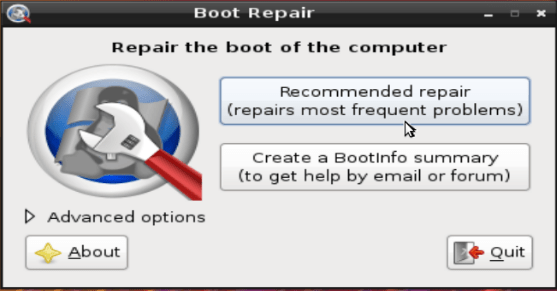
Boot-Repair-Disk is a simple tool to repair frequent boot issues you may encounter in Ubuntu, such as when you can't boot Ubuntu after installing Windows or some other Linux distribution. Or, when you can't boot into Windows after installing Ubuntu, or when GRUB is not displayed.
Key features include:
Easy to use.
Helpful (Boot-Info summary to get help by email or on your favorite forum).
Safe (automatic backups).
Can recover access to Windows (XP, Vista, Windows7, Windows8).
Can recover access to Debian, Ubuntu, Mint, Fedora, OpenSuse, ArchLinux.
Can recover access to any OS (Windows, MacOS, Linux) if your PC contains Debian, Ubuntu, Mint, Fedora, OpenSuse, ArchLinux, or a derivative.
Can repair MBR-locked OEM computer boot if the original bootsector has been saved by Clean-Ubiquity.
Can repair the boot when you have the "GRUB Recovery" error message.
Options to reinstall GRUB2/GRUB1 bootloader easily (OS by default, purge, unhide, kernel options..).
All in all, if you need access to a non-bootable drive and want something that has a few other features, such as tools for UEFI, SecureBoot, RAID, LVM, Wubi, and filesystem repair, then Boot-Repair is good piece of software to have. The downside is the filesize for the boor-repair disc is huge!
HOW TO GET AND USE THE DISK:
(1) DOWNLOAD BOOT-REPAIR-DISK,
(2) Then burn it on a live-USB key via Rufus or Unetbootin. (do not burn it on CD/DVD if your PC came with Windows8/10)
(3) Insert the Boot-Repair-Disk and reboot the PC,
(4) Choose your language,
(5) Connect internet if possible
(6) Click "Recommended repair"
(7) Reboot the pc --> solves the majority of bootsector/GRUB/MBR problems
Whats New:
Updates: official site does not provide any info about changes in this version
Homepage
https://sourceforge.net/p/boot-repair-cd/home/Home/
Buy Premium Account From My Download Links & Get Fastest Speed.
Download From Rapidgator
https://rapidgator.net/file/7a0ec8d257d626b62099b33b29d8fc45/boot.repair.disk-64bit.rar.html
Download From NitroFlare
https://nitroflare.com/view/7190DB11753559F/boot-repair-disk-64bit.rar
Feel free to post your Boot-Repair-Disk 2020.6.13 (x64) Free Download, torrent, subtitles, free download, quality, NFO, Dangerous Boot-Repair-Disk 2020.6.13 (x64) Torrent Download, free premium downloads movie, game, mp3 download, crack, serial, keygen.