




Corsair SSD Toolbox 1.2.5.7 Multilingual | File Size: 5.45 MB
Corsair proudly brings you the Corsair SSD Toolbox. This helpful utility provides users with several powerful and useful tools for use with Corsair SSDs. If you have invested in a Corsair SSD recently, then there is a good chance that you want to make sure that you can enjoy it for the many years to come. Corsair SSD Toolbox is a lightweight piece of software designed to help you clean, secure delete data and optimize your volume to maintain its peak performance. Main functions:
Drive Information Tool - Shows you basic information about each drive in your system. The displayed information will include the disk model number, its serial number, firmware version, port number, disk size, ATA version, supported functions, disk temperature, total number of write and read operations. In addition, if you select a Corsair SSD, you will have the option of checking for firmware updates for supported Corsair SSDs. If a new firmware version is released, the user will be offered the option of downloading and installing the latest firmware version.
- Overprovision Tool - allows you to allocate part of the free space on the SSD for use by its SSD controller based on the principles dictated by Corsair. This gives the SSD controller the ability to ensure the durability and performance of your SSD. The seat reservation tool is only available for the Corsair SSD.
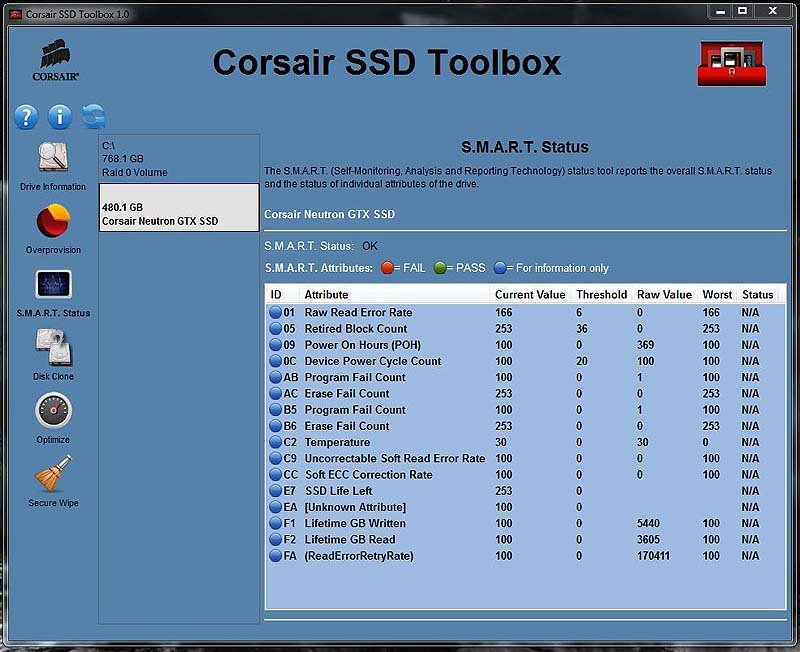
- Status tool S.M.A.R.T. (S.M.A.R.T. Status Tool) - shows the current status of S.M.A.R.T. (Self-Monitoring, Analysis and Reporting Technology) of the entire disk and its individual attributes and will work also if the system does not have a Corsair SSD.
- Disk Clone Tool - copies the contents of the selected source disk to the selected target disk. The tool will be enabled only if it detects an SSD in the system and selects it as the source or target disk for cloning. The cloning function supports increasing and decreasing partitions, which will allow you to clone a disk of a larger capacity to a smaller drive capacity and vice versa.
- Optimize (TRIM) Tool - sends a TRIM command informing the SSD about which data blocks are no longer in use, for example, about those left after the deleted files. Regular use of the TRIM command will help SSDs maintain maximum performance. TRIM can be started manually or according to an automatic schedule. The optimization tool is only available for the Corsair SSD.
- Secure Wipe Tool - allows the user to securely delete the entire contents of the disk. This function will return the disk to its original unformatted form without a file system. After starting this tool, data on the disk cannot be restored. As a security measure, the tool does not allow the user to erase the contents of his boot disk. Safe Removal Tool is only available for the Corsair SSD.
Whats New
Updates: official site does not provide any info about changes in this version.
Homepage
https://www.corsair.com/
Buy Premium Account From My Download Links & Get Fastest Speed.
Download From Rapidgator
https://rapidgator.net/file/11e9d1ba0ae4a91cd786388023c1d101/Corsair.SSD.Toolbox.rar.html
Download From AlfaFile
http://alfafile.net/file/8vcq3/Corsair.SSD.Toolbox.rar
Feel free to post your Corsair SSD Toolbox 1.2.5.7 Multilingual Free Download, torrent, subtitles, free download, quality, NFO, Dangerous Corsair SSD Toolbox 1.2.5.7 Multilingual Torrent Download, free premium downloads movie, game, mp3 download, crack, serial, keygen.