




Udemy - Blender 2.8 Game Character Creation
https://www.udemy.com/course/blender-28-game-character-creation/
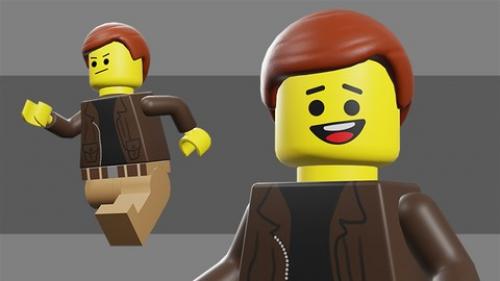
In this course we'll create a game character using Blender 2.8, and we'll export it to Unity and configure it so we can control it in the game engine.
Udemy - Blender 2.8 Game Character Creation
https://www.udemy.com/course/blender-28-game-character-creation/
In this course we'll create a game character using Blender 2.8, and we'll export it to Unity and configure it so we can control it in the game engine.
Description
Throughout the course, you will learn:
3D Modeling in Blender 2.8
UV Mapping
Texturing and Sculpting
Baking a Normal Map
Rigging a Character in Blender 2.8
Animating a 2D Face with Grease Pencil
Creating Animation Cycles for a Video Game
Exporting a Character and Animations from Blender 2.8 to Unity
Creating a C# Script in Unity to Control a Game Character
Beginning with the modeling, we'll use Blender 2.8 to build all the individual pieces of a Lego character. And then you'll learn how to UV map each of the parts, and then create an efficient, unified UV map of the entire character. We will use Blender's texture painting tools to create the clothes of the character, and we'll use the sculpt tools to create the high res details of the hair. You'll then learn how to bake a normal map in Blender and apply the textures to the character model.
Next, we'll work on rigging the character. We will begin with a single bone, and create the rig manually, so you can see how a character rig is built from the ground up. You'll learn how to create a Foot Roll Rig and how to use Blender 2.8's new process for creating Custom Shapes to control the character.
Once the rig is done, I'll show you a cool technique, using Blender 2.8's new Grease Pencil tools, to animate both a 2D drawn face and a 3D body at the same time. With this technique, we will create the character's Idle, Run, and Jump animations, ready to be used in a game engine.
You will then learn how to export the character, animations, and textures out of Blender and bring them into the Unity game engine. And here you will learn how to set-up the character in the game and even how to retarget third-party animations onto our character, using Unity's Humanoid Rig system.
Finally, we will write a simple C# script to incorporate our 2D and 3D animations, and get the character running around the level.
If you've ever wanted to create a game character, and are interested in getting up to speed in Blender 2.8, then this course is for you. So join me as we create a game character in Blender 2.8.
Who this course is for:
Anyone who would like to create a game character using Blender 2.8 and Unity
Course content
Introduction
Introduction
Modeling the Character
Modeling the Head
Creating the Torso
Modeling the Legs
Creating the Arm
Beginning the Hand
Finishing the Hand
Beginning the Hair
Finishing the Hair
UV Mapping
UV Mapping the Hips
UV Mapping the Head and Torso
UV Mapping the Leg and Arm
Creating a Unified UV Map
Texture Painting and Sculpting
Beginning to Texture Paint
Finishing the Base Colors
Painting the Jacket Detail
Texturing the Zipper and Belt
Adding Sculpt Detail to the Hair
Baking a Normal Map
Rigging the Character
Beginning the Rig
Creating the Arm and Leg Bones
Adjusting Roll and Mirroring
Binding the Character to the Rig
Weight Painting the Character
Adjusting and Testing Weights
Setting Up IK Legs
Creating the Foot Roll Bones
Foot Roll Parenting and Constraints
Setting Up the Toe and Knee Controls
Finishing the Weight Painting
Beginning the Control Object Bones
Finishing the Control Object Bones
Mirroring and Parenting Control Bones
Placing the Custom Shapes
Finishing the Rig
Animating the Character
Setting Up for Animation
Finishing the Interface Set-up
Drawing the 2D Face
Creating the Idle Animation
Animating the Head Turns and Blinks
Rendering and Testing the 2D Animation
Starting the Run Animation Cycle
Continuing the Run Animation
Finishing the Run Cycle
Creating the Jump Animation
Animating the Face for the Jump
Character Set-up in Unity
Exporting Assets to Unity
Creating and Importing the Sprite Sheets
Configuring the Character in Unity
Retargeting Third Party Animations
Setting Up the Animator Controller
Beginning the Player Script
Animating the Sprite Sheets
Activating the Face Objects
Configuring the Character Movement
Conclusion
Download

https://nitroflare.com/view/8C3C7124974EA94/Packt_Publishing_-_Blender_2.8_Game_Character_Creation.rar

https://rapidgator.net/file/3af6138e940c5a098044c098857fc43c/Packt_Publishing_-_Blender_2.8_Game_Character_Creation.rar.html
Throughout the course, you will learn:
3D Modeling in Blender 2.8
UV Mapping
Texturing and Sculpting
Baking a Normal Map
Rigging a Character in Blender 2.8
Animating a 2D Face with Grease Pencil
Creating Animation Cycles for a Video Game
Exporting a Character and Animations from Blender 2.8 to Unity
Creating a C# Script in Unity to Control a Game Character
Beginning with the modeling, we'll use Blender 2.8 to build all the individual pieces of a Lego character. And then you'll learn how to UV map each of the parts, and then create an efficient, unified UV map of the entire character. We will use Blender's texture painting tools to create the clothes of the character, and we'll use the sculpt tools to create the high res details of the hair. You'll then learn how to bake a normal map in Blender and apply the textures to the character model.
Next, we'll work on rigging the character. We will begin with a single bone, and create the rig manually, so you can see how a character rig is built from the ground up. You'll learn how to create a Foot Roll Rig and how to use Blender 2.8's new process for creating Custom Shapes to control the character.
Once the rig is done, I'll show you a cool technique, using Blender 2.8's new Grease Pencil tools, to animate both a 2D drawn face and a 3D body at the same time. With this technique, we will create the character's Idle, Run, and Jump animations, ready to be used in a game engine.
You will then learn how to export the character, animations, and textures out of Blender and bring them into the Unity game engine. And here you will learn how to set-up the character in the game and even how to retarget third-party animations onto our character, using Unity's Humanoid Rig system.
Finally, we will write a simple C# script to incorporate our 2D and 3D animations, and get the character running around the level.
If you've ever wanted to create a game character, and are interested in getting up to speed in Blender 2.8, then this course is for you. So join me as we create a game character in Blender 2.8.
Who this course is for:
Anyone who would like to create a game character using Blender 2.8 and Unity
Course content
Introduction
Introduction
Modeling the Character
Modeling the Head
Creating the Torso
Modeling the Legs
Creating the Arm
Beginning the Hand
Finishing the Hand
Beginning the Hair
Finishing the Hair
UV Mapping
UV Mapping the Hips
UV Mapping the Head and Torso
UV Mapping the Leg and Arm
Creating a Unified UV Map
Texture Painting and Sculpting
Beginning to Texture Paint
Finishing the Base Colors
Painting the Jacket Detail
Texturing the Zipper and Belt
Adding Sculpt Detail to the Hair
Baking a Normal Map
Rigging the Character
Beginning the Rig
Creating the Arm and Leg Bones
Adjusting Roll and Mirroring
Binding the Character to the Rig
Weight Painting the Character
Adjusting and Testing Weights
Setting Up IK Legs
Creating the Foot Roll Bones
Foot Roll Parenting and Constraints
Setting Up the Toe and Knee Controls
Finishing the Weight Painting
Beginning the Control Object Bones
Finishing the Control Object Bones
Mirroring and Parenting Control Bones
Placing the Custom Shapes
Finishing the Rig
Animating the Character
Setting Up for Animation
Finishing the Interface Set-up
Drawing the 2D Face
Creating the Idle Animation
Animating the Head Turns and Blinks
Rendering and Testing the 2D Animation
Starting the Run Animation Cycle
Continuing the Run Animation
Finishing the Run Cycle
Creating the Jump Animation
Animating the Face for the Jump
Character Set-up in Unity
Exporting Assets to Unity
Creating and Importing the Sprite Sheets
Configuring the Character in Unity
Retargeting Third Party Animations
Setting Up the Animator Controller
Beginning the Player Script
Animating the Sprite Sheets
Activating the Face Objects
Configuring the Character Movement
Conclusion
Download
https://nitroflare.com/view/8C3C7124974EA94/Packt_Publishing_-_Blender_2.8_Game_Character_Creation.rar
https://rapidgator.net/file/3af6138e940c5a098044c098857fc43c/Packt_Publishing_-_Blender_2.8_Game_Character_Creation.rar.html
Feel free to post your Udemy - Blender 2.8 Game Character Creation Free Download, torrent, subtitles, free download, quality, NFO, Dangerous Udemy - Blender 2.8 Game Character Creation Torrent Download, free premium downloads movie, game, mp3 download, crack, serial, keygen.