




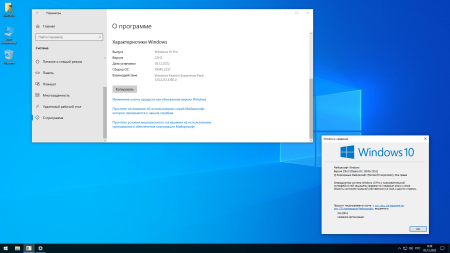
Windows x64 | English US/Russian | File Size: 2.66 GB
The assembly is based on the official original Windows_10_Pro_edition_22h2_x64 image for optimal and comfortable use. The purpose of this assembly is ease of use for everyday home use, business areas and gamers. Disabled, removed or blocked unwanted services / telemetry collection processes, adware, unwanted background services and anything that negatively affects performance, privacy, discomfort of everyday use - to the extent possible.
Windows: 10
Edition: Pro
Version: 22H2
Build: 19045.2251
Architecture: x64
Author: SanLex
Language: Russian, English
File Size: 2.66 GB
Format: ISO
Activator: Not Included
What's New
Overall performance is improved at least ~20%
Release/build installation speed is improved at least ~20%
Performance in PC/Online games is improved at least ~ 10%
Improved battery savings for laptops at least ~10%
Installing drivers via Windows Update in manual mode
Improved performance for HDD drives at least ~20%
Disabled additional telemetry-data collection at least ~+ -30%
Improved performance in heavy programs like Adobe Photoshop etc.
Services related to remote use, server nature is not affected (default)
Protection in the absence of anti-virus applications, when ing via torrent resources at least ~50%
This build includes the best quality performance, security, anti-telemetry ~100%
Memory dump is disabled by default, a bypass was found way to not create BSOD (Blue Screen of Death)
It is categorically unacceptable to use any tweaker/optimizers (otherwise everyone is responsible for himself)
Release/build completely under the guidance of the User, no automatic installations until the user himself allows
During installation Edge browser (in case), EdgeWebView is blocked, which will not be installed (savings in the region of ~ + -500 MB)
Strict view of the image when installing a release / build - no flashing backgrounds, only a specific background and text accompanied by the installation
Tweakers are attached to the disk image along the path: sources> Tweakers / tweaker-pack is sorted into shelves, each of which is in its own folder, so that do not get confused when using
Automatically disable background applications / services when not in use / after closing, such as: System settings, Microsoft Store, all applications that belong to the Microsoft store
... And much more, so you will not remember right away.
Removed
OneDrive
People app
Maps app
Microsoft Edge browser
Cortana - voice assistant (search works by default)
Xbox apps (if you want to restore core Xbox apps from Microsoft Store)
Removed all Metro apps except Microsoft Store (additional apps can be installed from the Microsoft store)
Enabled/Installed
Windows 7 Calculator (original)
Net Framework 3.5, (includes Net 2.0 and 3.0)
Clea+ "disk cleanup" along the path: Start menu > Windows Administrative Tools
Photo Viewer "Windows Photo Viewer" as on Windows 7, 8.1 ( default)
Disabled/Blocked (the list is partial - one way or another, many will not understand everything)
Event collection
Diagnostics and feedback
Activity history (partly)
Desktop analytics collection
User Account Control (UAC)
Notification access (partial)
Delivery optimization from other PCs
Resource discovery publications
Steps Recorder
Access to spam messages
Adware (Consumer Experience)
Standard diagnostic center collector
Sending data after installing Windows
Cloud content synchronization with Microsoft
Screen blur on Windows logon
Sending activity data collection to Microsoft
Retrieving device metadata from the Internet
Contact information and typed text collection
Windows compatibility data collection telemetry
Microsoft mail sync, calendar, etc.
Customer Experience Improvement Program (SQMClient/CEIP)
Biometric fingerprint identification
Speech recognition application
Disk backup for Microsoft update needs
Contact information (part removed or blocked)
Get information about games and options from the Internet
Event logging and tracking records (partially)
Unwanted event collection is automatically blocked
Send data to Microsoft about its activation status
Microsoft Keylogger ( partially) deleted or blocked)
Typing analysis and handwriting personalization
Physical/Internet cloud sync
Promotional information and app launch tracking
Windows Media Player metadata capture
Cortana voice assistant (search works by default)
Windows 10 Insider Preview program
Windows Defender - full package (non-recoverable)
User data storage (part deleted or blocked)
Basic telemetry for Mozilla Firefox and Google Chrome browsers
Background services, processes, unwanted applications
OneDrive - cloud storage (part deleted, part blocked)
Unwanted syncs (Microsoft, adware, etc.)
Windows Spotlight (s Bing images, ads, tips, etc.)
Auto turn off telemetry like in Windows 10 Enterprise
Sending predictions of web pages visited to Microsoft
Automatic installing Windows updates (works in manual mode)
Privacy settings Application permissions (most)
Telemetry data collection Microsoft reporting on improving Windows performance
Backup for the needs of hibernation (sleep is enabled by default)
In the Task Scheduler - undesirable is disabled, deleted or blocked
Folders in This PC (Documents, s, Music, Pictures, Videos, 3D objects)
Network protocol - Teredo (use carries more threats to the user than benefit)
Application access to user advertising information (added, that is, blocked)
All global data collection telemetry blocked or removed + auto-blocking in which case
Indexing, caching Windows Search content (clutters up the hard drive system over )
Expentation to explore user preferences, data collection, and device behavior
Xbox Apps - Game bar, capture of game clips and screenshots subject to recovery (internet help)
Automatic blocking of telemetry / data collection on future Windows updates 10 (Tuesday patches/fixes), etc.
Automatically disable background services during normal-everyday use to save laptop battery and save power for desktop PCs
Clipboard log, violates privacy (more information regarding clipboard versatility in the Internet search ee)
HomePage:
Code:
https://www.microsoft.com/DOWNLOAD
1dl
Code:
https://1dl.net/vcka6ws176mb/y393ZinW__W190452251_.part1.rar
https://1dl.net/lt9wxjtmq3jd/y393ZinW__W190452251_.part2.rar
https://1dl.net/y3mjq9x3t1b0/y393ZinW__W190452251_.part3.rar
rapidgator
Feel free to post your Windows 10 Pro 22H2 19045.2251 x64 by SanLex (Extreme Edition) En/Ru 2022 Free Download, torrent, subtitles, free download, quality, NFO, Dangerous Windows 10 Pro 22H2 19045.2251 x64 by SanLex (Extreme Edition) En/Ru 2022 Torrent Download, free premium downloads movie, game, mp3 download, crack, serial, keygen.